Legacy music transfer from your iPad or iPhone
Keep the old iPods useful: transfer your own DRM-free music straight from your iPad or iPhone, with verified backups at every step. Everything happens locally — no computer, no account, no cloud.
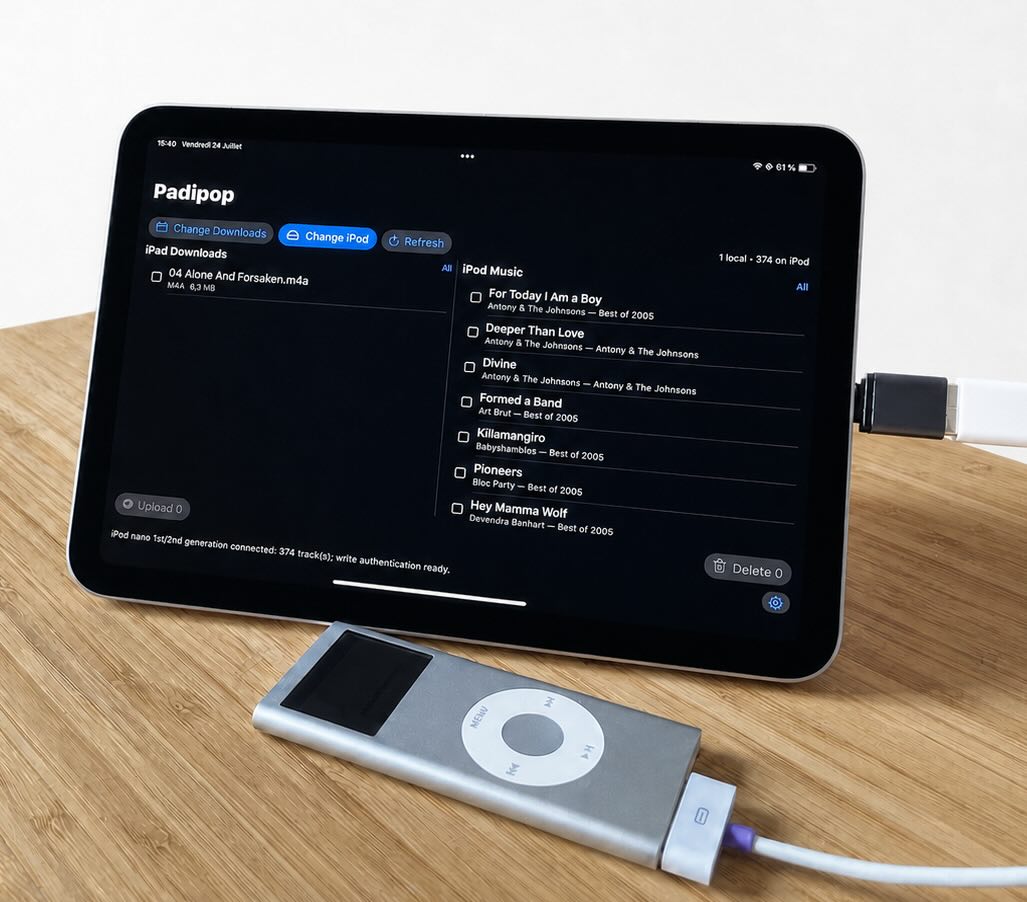
What padipop does
You select the player's storage volume in the system Files picker, and padipop works only inside that folder — using a plain USB connection and public iPadOS APIs.
Safety first
Before any change, padipop backs up the player's library database and verifies the backup. If a check fails, padipop stops instead of writing. The first time it sees an iPod, it also keeps a permanent snapshot of the original library.
Changes are staged, committed last, re-parsed, and verified; a failed check stops before anything destructive happens and rolls the change back. Even if the cable is pulled mid-transfer, padipop repairs the interrupted operation the next time the player is connected.
The built-in Review Demo loads a clearly labelled synthetic sample library so you can try every feature — upload, metadata update, duplicate detection, deletion, backups — before connecting anything.
See it in action


Compatibility
Check your model below before buying. The player must appear as a storage location in the Files app; an adapter or a powered hub may be required.
| Device | Status | Notes |
|---|---|---|
|
|
Verified | Physically verified end to end, connected to a USB-C iPad. |
|
|
Verified One-time setup | Physically verified after a one-time desktop setup step — run the Hash58 Setup Helper once from desktop Chrome or Edge, then reconnect. |
|
|
Need testing | Their music databases work just like the iPod nano 2, so they should work just fine! Padipop still needs model-specific hardware tests. iPod 3 needs special confirmation because of its data only USB connection. |
|
|
Need testing One-time setup | The app and hash58 helper implement their profiles. They have not been physically tested with padipop yet. |
|
|
Hardware incompatible | FireWire-only players cannot connect through the iPad's USB port. |
|
|
Out of scope | Nano 5 adds Hash72, SQLite libraries and iTunesCDB; Nano 6
moves to HashAB. Writing only FirewireGuid is not enough. |
|
|
Out of scope | Shuffles use a different writer to their DB. Padipop has not ported that backend. |
|
|
Out of scope | They do not expose an ordinary selectable disk-mode volume to the iPad Files app. |
padipop handles only DRM-free files you provide. It does not access Apple Music or the iTunes Store, does not remove copy protection, and does not modify device firmware.
Support
Email juliendorra@juliendorra.com — please include your player model and iPadOS version.
The privacy policy is published at juliendorra.com/padipop/privacy — the short version: padipop collects nothing, and makes no network connections.